Enterprise Office 365 Consulting & Cloud Migration Mastery

Figure 1: Enterprise Cloud Architecture and Microsoft 365 Tenant Topology 3D Render.
In the modern enterprise landscape, digital transformation is no longer a strategic option; it is an absolute operational imperative. As organizations scale across distributed geographies, hybrid work models, and multi-cloud ecosystems, the foundation of corporate productivity rests squarely on the stability, security, and scalability of their core communication and collaboration platforms. Yet, transitioning legacy systems to Microsoft 365 (M365) is fraught with hidden operational traps. From catastrophic data loss during email cutovers to severe productivity bottlenecks caused by misconfigured identity federations, the margin for error is razor-thin.
Navigating these complexities requires specialized expertise that internal IT teams, often stretched thin by day-to-day operational support, rarely possess in-house. This is where strategic office 365 consulting becomes the defining factor between a chaotic, budget-bleeding migration and a seamless, high-performance cloud deployment. Whether you are migrating thousands of mailboxes from an on-premises Exchange infrastructure, consolidating disparate tenant architectures following a corporate merger, or fortifying your security posture against sophisticated cyber threats, partnering with an elite cloud migration provider ensures enterprise continuity, strict regulatory compliance, and rapid return on investment.
For further foundational insights into organizational readiness, we invite you to explore the Work365 Knowledge Base and review our deep-dive Microsoft Office 365 Consultant Guide to understand how top-tier architects approach large-scale deployments.
The Anatomy of a Flawless Enterprise Tenant Migration
Executing an enterprise tenant migration requires a rigorous, multi-phased architectural blueprint. A poorly planned migration introduces compounding risks, including orphaned user permissions, corrupted metadata, extended downtime windows, and compliance breaches. Elite cloud architects approach every engagement by treating the migration lifecycle as an exact engineering discipline divided into four critical phases: Discovery and Assessment, Architecture and Design, Staged Execution, and Post-Migration Optimization.
Assessing Legacy Environments and Technical Debt
Before a single byte of corporate data is moved to the cloud, a comprehensive discovery audit must be conducted. Legacy environments—whether built on aged Microsoft Exchange servers, IBM Domino, Google Workspace, or fragmented IMAP/POP setups—frequently accumulate vast amounts of technical debt. This includes dormant accounts, oversized mailboxes containing non-compliant archive data, deprecated public folders, and deeply nested permission structures that do not map cleanly to modern SharePoint Online or OneDrive architectures.
Professional consulting teams deploy advanced discovery tooling to profile directory services, analyze mail item distributions, identify external sharing risks, and map out application dependencies. This discovery phase prevents the migration of redundant or malicious data into your pristine new M365 tenant, significantly reducing storage costs and streamlining governance policies from day one.
Identity Federation, Entra ID Connect, and Hybrid Topologies
At the heart of any enterprise M365 deployment is identity management. Organizations with legacy Active Directory Domain Services (AD DS) must establish a robust hybrid identity model to bridge on-premises security boundaries with cloud resources.
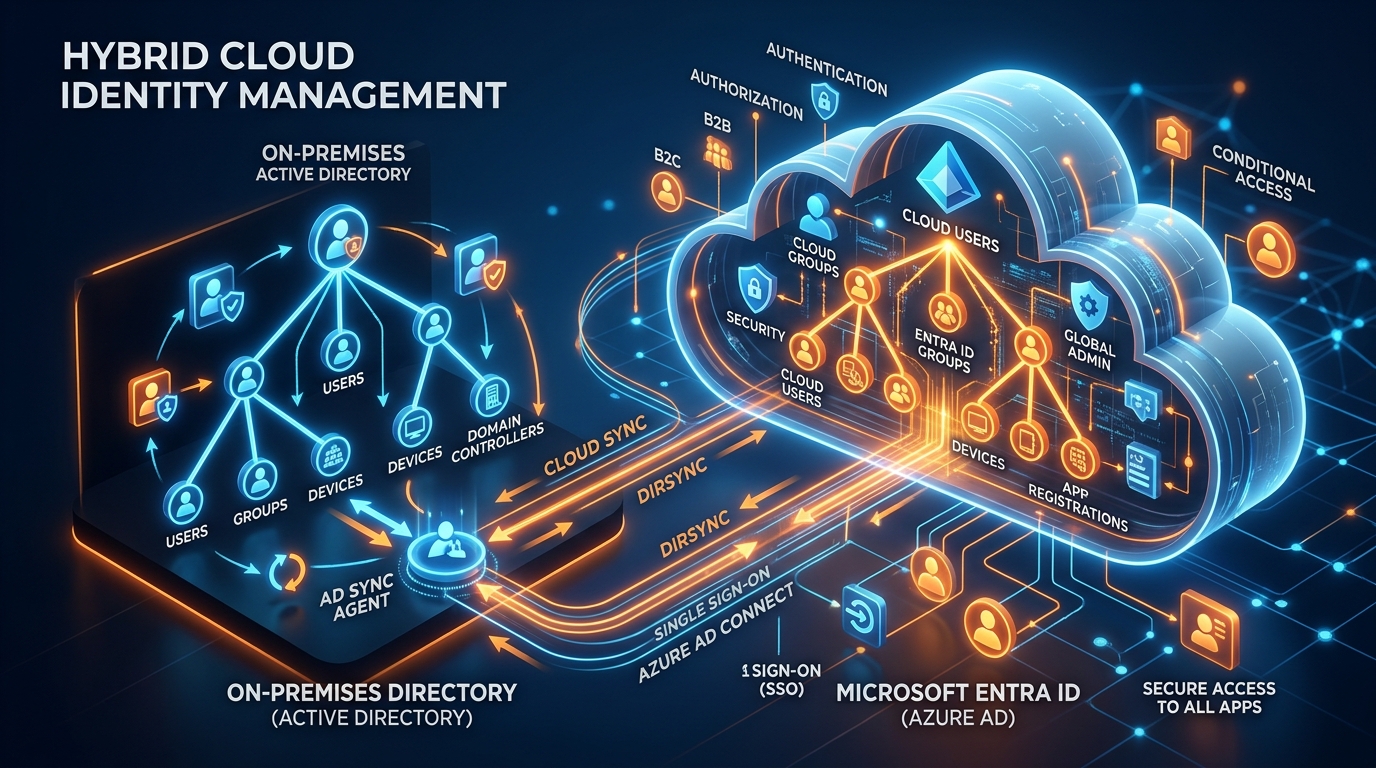
Figure 2: Hybrid Cloud Identity Management and Entra ID Topology 3D Graphic.
Configuring Microsoft Entra ID Connect (formerly Azure AD Connect) demands meticulous planning around synchronization rules, password hash synchronization (PHS), pass-through authentication (PTA), or active federation via Active Directory Federation Services (AD FS) / third-party identity providers like Okta or Ping Identity. A misconfigured synchronization rule can result in duplicate user objects, permission stripping, or severe authentication loops that lock out entire business units. Expert consultants ensure that user identities, security groups, and contact objects migrate seamlessly, preserving access control lists (ACLs) and ensuring uninterrupted single sign-on (SSO) experiences for all personnel.
Executing a Seamless Exchange to Microsoft 365 Migration
For most enterprise organizations, email is the lifeblood of daily operations. An incomplete or poorly executed exchange to microsoft 365 migration can paralyze executive communications, halt customer service operations, and severely damage corporate reputation. To eliminate these risks, architects utilize proven migration topologies matched specifically to the organization's scale, bandwidth constraints, and operational windows.
Choosing the Right Migration Methodology: Cutover vs. Staged vs. Hybrid
Selecting the correct migration methodology is the cornerstone of a successful transition:
- Cutover Migration: Best suited for small-to-medium enterprises with fewer than 2,000 mailboxes running Exchange 2010 or higher. All mailboxes, distribution lists, and contacts are migrated to the cloud in a single, coordinated weekend window. While fast, it requires robust network bandwidth and careful scheduling to avoid throttling limits.
- Staged Migration: Designed for larger organizations with legacy Exchange environments (2003/2007) where mailbox counts exceed cutover thresholds, but a hybrid infrastructure is undesirable. Batches of user mailboxes are migrated over several weeks or months, allowing IT teams to manage workloads incrementally.
- Hybrid Migration: The gold standard for modern enterprises. A hybrid deployment maintains a simultaneous coexistence between on-premises Exchange servers and Exchange Online. This approach allows for seamless, friction-free mailbox moves with zero downtime, preserved internal routing, free/busy calendar sharing, and a gradual transition of user workloads at the enterprise's own pace.
Overcoming Data Integrity and Throttling Hurdles
When deploying high-volume email migration solutions, organizations routinely run into Microsoft Exchange Online throttling policies, network bandwidth saturation, and data corruption issues. If migration streams overwhelm available egress bandwidth, business-critical cloud applications grind to a halt.

Figure 3: Secure Email Migration Solutions Network Data Flow 3D Visualization.
Elite consultants implement sophisticated bandwidth shaping, dedicated ExpressRoute or VPN circuits, and parallelized migration batches to optimize throughput without starving local network operations. Furthermore, specialized migration tools perform automated validation checks, ensuring that message headers, MIME properties, read/unread states, and folder hierarchies remain entirely intact during transit. For scenarios involving legacy archives or standalone data files, specialized procedures outlined in our comprehensive Import PST to Office 365 Guide ensure that historical records are safely indexed and searchable within the new environment.
Advanced Security Hardening and Compliance in M365 Deployments
Moving to the cloud offers unprecedented operational agility, but it also expands the corporate attack surface. Threat actors actively target cloud tenants using advanced credential stuffing, phishing campaigns, and lateral movement techniques. Therefore, a secure deployment cannot rely on default configurations. It requires rigorous, proactive security hardening from the moment the tenant is provisioned.
Zero Trust Architecture and Conditional Access Policies
A modern security posture must adopt a Zero Trust philosophy: "Never trust, always verify." Expert consultants implement advanced Microsoft Entra ID Conditional Access policies that evaluate user sign-on requests in real time based on multiple risk signals, including:
- Device Health and Compliance: Ensuring that only managed, encrypted, and Intune-compliant endpoints can access corporate email and sensitive SharePoint repositories.
- Location and Risk-Based Access: Automatically blocking or challenging login attempts originating from impossible travel scenarios or high-risk IP addresses flagged by Microsoft Threat Intelligence.
- Mandatory Multi-Factor Authentication (MFA): Enforcing phishing-resistant authentication methods, such as FIDO2 security keys or Microsoft Authenticator number-matching, across all user tiers, with zero exemptions for executive leadership.
Information Protection, Data Loss Prevention (DLP), and Compliance Boundaries
Enterprises operating in regulated industries—such as finance, healthcare, defense, and legal services—must comply with stringent regulatory frameworks like GDPR, HIPAA, PCI-DSS, and NIST. Without proper governance controls, employees can inadvertently share intellectual property, personally identifiable information (PII), or financial records externally.

Figure 4: Enterprise Cybersecurity Zero Trust Security Framework 3D Model.
Consultants leverage Microsoft Purview to establish automated Data Loss Prevention (DLP) policies, sensitivity labels, and retention schedules. These tools automatically detect, classify, and protect sensitive data across Exchange, Teams, SharePoint, and OneDrive, encrypting confidential documents in transit and at rest while preventing unauthorized exfiltration.
Internal IT Limitations vs. Certified Implementation Partners
When enterprise leadership evaluates whether to handle an M365 deployment internally or engage an external professional services firm, they must weigh internal resource constraints against the quantifiable risks of project failure. The table below outlines the core structural differences between relying on internal IT teams versus partnering with a certified implementation firm.
| Evaluation Metric | Internal IT Team Approach | Certified Implementation Partner |
|---|---|---|
| Specialized Expertise | Generalist skill set; limited exposure to complex multi-tenant enterprise migrations. | Master-level cloud architects with hundreds of successful enterprise deployments. |
| Project Velocity & Timeline | Prone to delays due to competing daily helpdesk support demands and operational firefighting. | Dedicated project management ensuring strict adherence to timelines and milestone targets. |
| Downtime & Risk Mitigation | High risk of unexpected outages, data corruption, and prolonged user disruption. | Risk-engineered deployment strategies guaranteeing zero unplanned downtime. |
| Security & Compliance Hardening | Relies heavily on default M365 settings, leaving latent vulnerabilities unaddressed. | Comprehensive Zero Trust hardening, advanced DLP, and regulatory compliance alignment. |
| Total Cost of Ownership (TCO) | Hidden costs through lost productivity, prolonged troubleshooting, and project overruns. | Fixed-cost predictability with rapid ROI and optimized licensing expenditures. |
Strategic Evaluation Checklist for Choosing an M365 Consulting Firm
Selecting the right partner to lead your cloud transformation is a critical business decision. To ensure you engage a truly capable m365 deployment partner, IT Directors and CTOs should evaluate prospective consultants against a rigorous set of professional criteria:
- Verified Microsoft Cloud Partner Credentials: Confirm that the firm holds advanced Microsoft Solutions Partner designations in Modern Work and Security, backed by certified Azure Solutions Architect and Microsoft 365 Enterprise Administrator certifications.
- Proven Enterprise Portfolio: Request verifiable case studies and references from organizations of similar scale and industry complexity that successfully completed migrations under the firm's guidance.
- Comprehensive Methodology and Runbooks: Ensure the partner provides detailed, step-by-step project runbooks, rollback contingencies, and communication templates designed to keep stakeholders informed at every stage.
- Post-Migration Support and Enablement: A successful migration does not end at cutover. Look for partners that offer post-migration HyperCare support, end-user adoption training, and ongoing tenant optimization services.
- Transparent Pricing and Licensing Optimization: Evaluate whether the partner helps you rationalize your Microsoft licensing tiers (e.g., Business Premium vs. E3/E5) to maximize feature utilization while eliminating redundant licensing waste.
Scalable Packages, Investment, and ROI of Professional Consulting
Investing in expert advisory services is a direct investment in business resilience and operational efficiency. Many enterprises hesitate to engage consultants due to perceived cost barriers, failing to account for the immense financial drain caused by internal migration failures, employee downtime, and security breaches.
Professional consulting services are structured to deliver immediate value by right-sizing your tenant architecture, eliminating unnecessary license overhead, and securing your digital workspace against costly ransomware and data exfiltration incidents. To review our transparent, tiered service models designed for organizations of all sizes, visit our Office 365 Package & Pricing page. Whether you require a rapid migration assessment, a full-scale enterprise tenant consolidation, or ongoing security governance, our structured packages provide predictable pricing and guaranteed execution excellence.
Conclusion and Next Steps for Enterprise Leaders
The journey to the cloud represents a transformative milestone in your organization's operational evolution. While the technical hurdles of migrating complex legacy systems, harmonizing hybrid identities, and enforcing zero-trust security are significant, they are entirely surmountable with the right strategic guidance. Attempting to bypass professional expertise in favor of an internal DIY approach exposes your enterprise to unacceptable levels of downtime, security vulnerability, and user frustration.
By partnering with seasoned cloud architects, you insulate your business from operational risk, accelerate your time-to-value, and empower your workforce with a secure, highly collaborative, and future-proof digital workplace. Do not leave your organization's cloud transformation to chance.
Take the next step in securing your enterprise future by exploring our tailored Office 365 Package & Pricing options or reaching out to our expert team today to schedule your comprehensive enterprise migration consultation.
Get Genuine Office 365 Pack for $10
Unlock full desktop applications, 1TB OneDrive cloud storage, and 1-year full warranty.
Order $10 Pack via WhatsApp