Enterprise Microsoft Office 365 Consultant Cloud Guide
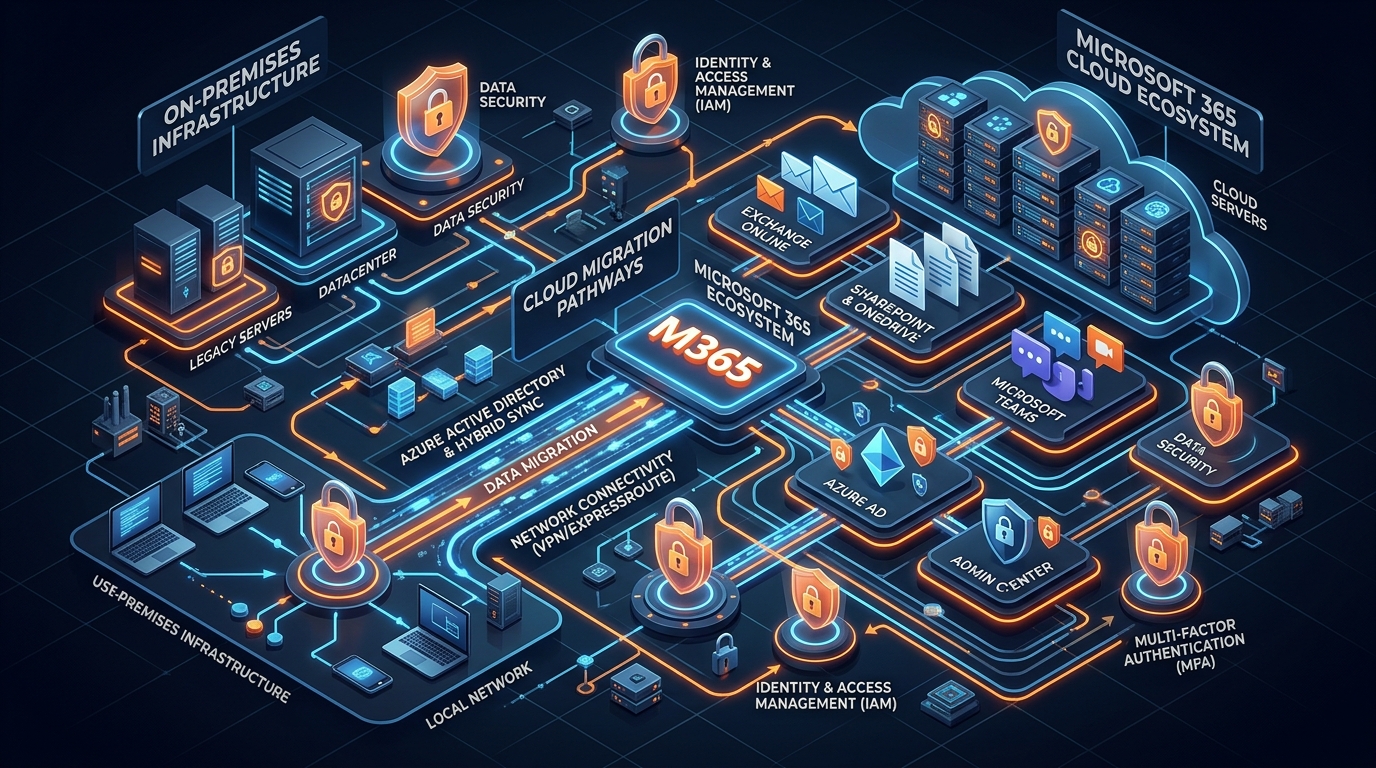
Figure 1: Enterprise Microsoft 365 Cloud Migration Infrastructure & Security Architecture Blueprint.
Executive Overview: The Strategic Imperative of Professional Cloud Modernization
Transitioning an enterprise IT infrastructure to the Microsoft 365 cloud environment is far more than a routine software maintenance cycle—it represents a fundamental modernization of corporate digital operations. Modern enterprise environments can no longer afford the financial burden and security risks associated with legacy, on-premises infrastructure. Aging Microsoft Exchange servers, disconnected file repositories, fragmented communication stacks, and unmanaged endpoints create severe operational bottlenecks while expanding the organizational attack surface.
However, moving tens of thousands of active mailboxes, multi-terabyte SharePoint document structures, and complex identity hierarchies to the cloud introduces substantial operational exposure. Unplanned service interruptions during a cutover can disrupt revenue-generating workflows, costing enterprise organizations tens of thousands of dollars per hour in lost productivity and breached customer agreements. Data corruption, lost historical archives, misconfigured access controls, and broken identity federations can cause operational friction long after the migration phase concludes.
This master guide arms IT Directors, Chief Technology Officers (CTOs), and enterprise decision-makers with the technical blueprint necessary to design, execute, and secure an enterprise-scale cloud transformation. Partnering with a battle-tested microsoft office 365 consultant and certified m365 deployment partner converts a high-stakes migration into a controlled, zero-downtime initiative. From initial infrastructure auditing and hybrid topology engineering to staged data ingestion and Zero Trust security configuration, engaging a specialized cloud migration provider guarantees predictable execution.
To review transparent service tiers and structured implementation models for your organization, review our comprehensive Office 365 Package & Pricing options built for enterprise environments.
Technical Migration Topologies & Architectural Frameworks
Selecting the correct migration architecture is the foundational engineering decision of any cloud transformation initiative. The chosen framework dictates network bandwidth requirements, user authentication flow, co-existence capabilities, and business continuity guarantees.
A qualified microsoft office 365 consultant conducts a deep assessment of legacy server health, directory structures, active directory schemas, network throughput, and compliance requirements to determine the optimal topology from four standardized deployment models.
1. Cutover Migration Architecture
A Cutover Migration is designed for small-to-midsize business environments (typically under 200 mailboxes) migrating from legacy Exchange instances (Exchange Server 2003 or newer). In a cutover model, all mailboxes, security groups, distribution lists, and user contacts are provisioned and transferred to Exchange Online in a single continuous operation.
Key technical milestones during a cutover migration include:
- Directory Provisioning: Cloud user accounts and Exchange Online mailboxes are automatically created during the initial data synchronization pass.
- Exchange Web Services (EWS) Integration: Data is extracted via secured EWS endpoints or RPC over HTTP interfaces directly from the on-premises source environment.
- Global Domain Cutover: Domain Name System (DNS) records—specifically MX, Autodiscover, and SPF records—are repointed to cloud endpoints at a designated cutover timestamp.
While conceptually straightforward, cutover migrations demand rigorous pre-flight testing. Because all end-users transition simultaneously, any undiscovered directory inconsistency or authentication mismatch can result in immediate helpdesk saturation.
2. Staged Migration Topology
For organizations running legacy Exchange Server 2003 or 2007 infrastructure with user populations exceeding 200 mailboxes, a Staged Migration offers a controlled, phased approach. Rather than forcing a single cutover window across the entire workforce, user batches are migrated incrementally over weeks or months.
The staged framework relies on identity synchronization establishing a unified directory before mailbox transfer begins:
- Directory Synchronization: On-premises Active Directory Domain Services (AD DS) objects are continuously synchronized to Microsoft Entra ID (formerly Azure Active Directory) using Microsoft Entra ID Connect.
- TargetAddress Attribute Modification: Incoming mail delivery is managed by modifying the
targetAddressattribute on legacy mailboxes. This automatically routes mail intended for migrated users across secure transport pipelines to their corresponding@tenant.onmicrosoft.comcloud mailboxes. - Phased Departmental Execution: User batches are organized logically by operational unit, location, or risk profile, ensuring manageable post-migration support workloads.
3. Hybrid Deployment Architectures (Full Coexistence vs. Express Hybrid)
For enterprise organizations managing between 500 and over 100,000 active mailboxes, retaining long-term coexistence between on-premises infrastructure and cloud environments is mandatory. Architecting a seamless exchange to microsoft 365 migration via an Exchange Hybrid deployment represents the global gold standard for enterprise migrations.
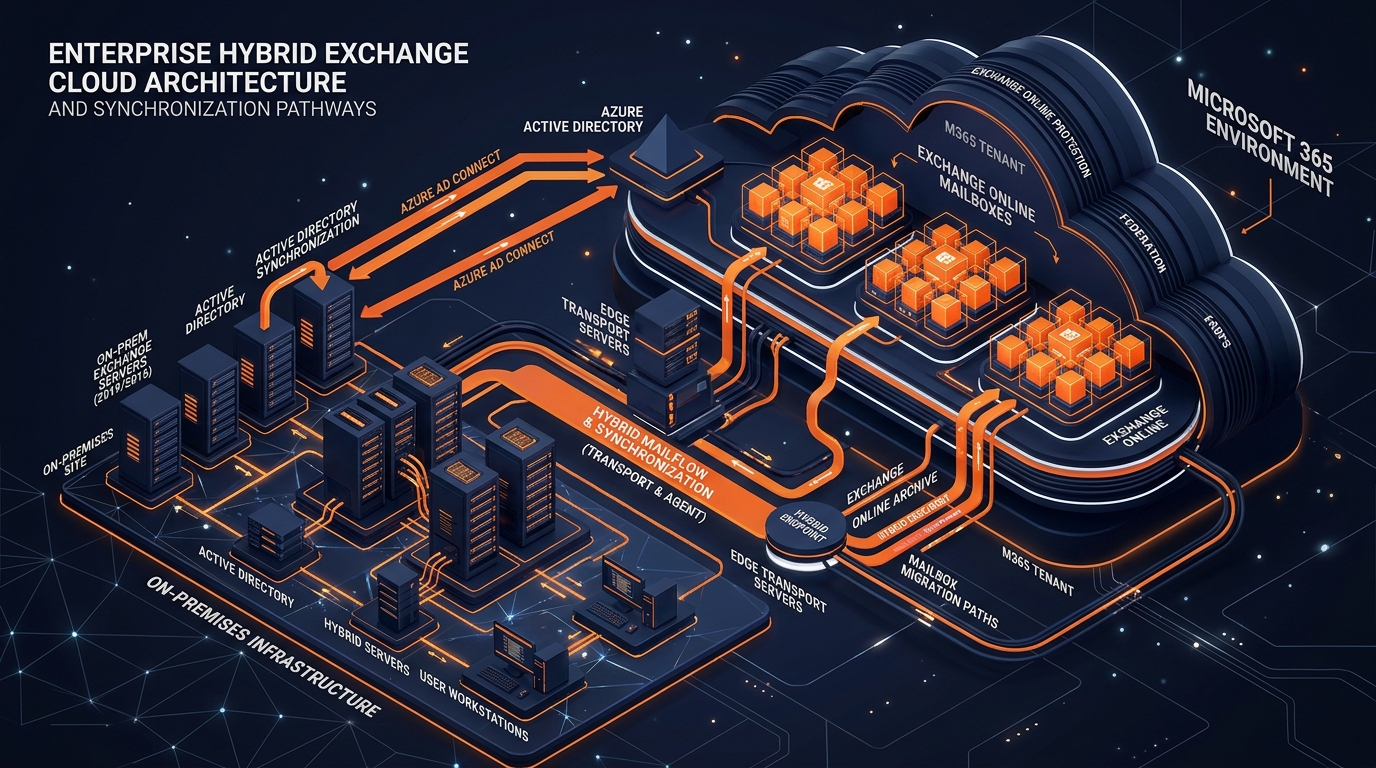
Figure 2: High-Tech 3D Rendering of Enterprise Hybrid Exchange Cloud Architecture.
Full Hybrid Coexistence
Full Hybrid topology establishes absolute bidirectional transparency between on-premises Exchange servers (Exchange 2013, 2016, or 2019) and Exchange Online using the Exchange Hybrid Configuration Wizard (HCW):
- Unified Cross-Premises Mail Routing: Secure Transport Layer Security (TLS) mail channels share a single domain namespace. External internet mail enters via a centralized hub and routes internally to on-premises or cloud destinations without exposing internal routing headers.
- Cross-Premises Free/Busy Calendar Visibility: Federated trust relationships and the Exchange Federation Gateway allow cloud-hosted users and on-premises users to view real-time calendar availability, schedule meetings, and manage room resources seamlessly.
- Mailbox Replication Service (MRS) Proxy: Mailbox data is moved live using the Mailbox Replication Service Proxy engine via encrypted HTTPS endpoints. End-users continue working in Outlook uninterrupted while gigabytes of data stream in the background. Once the final delta synchronization completes, the user’s Outlook desktop client automatically updates its connection string to point to Exchange Online—no profile recreation required.
Minimal Hybrid (Express Migration Framework)
For organizations that want the fast background streaming capabilities of the Mailbox Replication Service (MRS) but do not require long-term cross-premises free/busy lookups or shared domain routing, Minimal Hybrid provides a streamlined alternative. It provisions identity synchronization and configures basic MRS endpoints, enabling high-velocity mailbox transfers without the administrative overhead of full federation maintenance.
4. Enterprise Tenant-to-Tenant (T2T) Migration Architecture
Corporate mergers, acquisitions, spin-offs, and divestitures regularly demand moving thousands of identities, mailboxes, SharePoint sites, and Microsoft Teams ecosystems from one Microsoft 365 cloud tenant to another. Enterprise tenant-to-tenant migrations represent one of the most complex engineering disciplines in cloud consulting.
Executing a successful T2T migration requires specialized management across multiple operational tiers:
- Custom Domain Migration & DNS Orchestration: Moving branded custom domain names (
@company.com) between cloud tenants requires precise sequence management. The domain must be completely disassociated from all cloud objects in the source tenant before it can be registered and verified in the target tenant during the cutover window. - SharePoint Online & OneDrive Data Streaming: High-performance migration engines utilize Microsoft Graph APIs and Azure Blob Storage staging containers to ingest multi-terabyte document structures. Advanced migration scripts preserve deep folder trees, custom metadata, file version histories, and item-level permissions (ACLs).
- Microsoft Teams Contextual Data Ingestion: Transitioning Teams environments requires capturing channel message threads, direct 1:1 chat histories, document tabs, and embedded channel media, followed by structured re-injection into the target tenant's Teams hierarchy.
To explore advanced architectural strategies for enterprise environments, consult our dedicated Microsoft Office 365 Consultant Guide.
Zero-Downtime Identity Synchronization & Directory Federation Blueprint
Identity serves as the primary security perimeter and structural spine of the Microsoft 365 platform. Improperly designed identity synchronization pipelines cause duplicate user objects, login loops, missing Global Address List (GAL) entries, and severe authentication failures across enterprise applications.
A certified microsoft office 365 consultant designs identity frameworks around the organization's compliance requirements, network infrastructure, and security policies.
Enterprise Identity Model Selection
Deploying Microsoft Entra ID Connect facilitates continuous synchronization of users, groups, and contact objects from local Active Directory Domain Services (AD DS) to Microsoft Entra ID.
1. Password Hash Synchronization (PHS)
Password Hash Synchronization is the recommended baseline model for most enterprise environments. Microsoft Entra ID Connect extracts password hashes from on-premises Active Directory, applies secondary cryptographic hashing algorithms (1,000 iterations of SHA-256 with dynamic salt), and securely transmits the hashes to Entra ID over TLS. PHS provides the highest availability because authentication occurs entirely in the cloud, removing dependencies on internal network infrastructure.
2. Pass-Through Authentication (PTA)
For enterprises with strict compliance policies prohibiting password hashes—even doubly hashed values—from leaving local premises, Pass-Through Authentication provides direct validation. Light-weight software agents deployed within the internal corporate network intercept cloud authentication requests and validate them directly against internal Active Directory Domain Controllers via encrypted outbound connections.
3. Active Directory Federation Services (AD FS)
AD FS represents a fully federated, hardware-intensive identity topology. Authentication is offloaded entirely to local AD FS server farms using Security Assertion Markup Language (SAML) or WS-Federation protocols. While offering granular access control capabilities, AD FS introduces high operational complexity and single-point-of-failure risks if redundant federation proxy servers are not maintained.
Account Provisioning: Soft-Matching vs. Hard-Matching
When onboarding existing cloud objects or executing staged directory synchronizations, local directory objects must be mapped precisely to their cloud counterparts to avoid account duplication.
- Soft-Matching (SMTP & UPN Mapping): Correlates a local Active Directory account to a cloud account by comparing the primary email address (
mail) or User Principal Name (UPN). - Hard-Matching (ImmutableID Injection): Establishes an unshakeable cryptographic link by mapping the on-premises
objectGUIDdirectly to the cloud account'sImmutableIDattribute.
The 3-Stage Zero-Downtime Migration Execution Blueprint
- Phase 1: Pre-Migration Prep & TTL Reduction: Lower DNS TTL to 300 seconds (72 hours prior) for rapid propagation.
- Phase 2: Backstage Data Staging & Incremental Syncing: Background pre-seeding of 95%+ historical mailbox content. Explore our Import PST to Office 365 Guide for archive ingestion strategies.
- Phase 3: Final Cutover Window & Profile Re-pointing: Final delta sync pass, MX DNS repointing to EOP, and client Autodiscover connection updates.
Enterprise Security Hardening & Zero Trust Compliance Architecture
Migrating infrastructure to the cloud without establishing robust security posture exposes sensitive enterprise assets to global attack vectors. A certified m365 deployment partner deploys modern Zero Trust security frameworks across the organization simultaneously with workload migration.
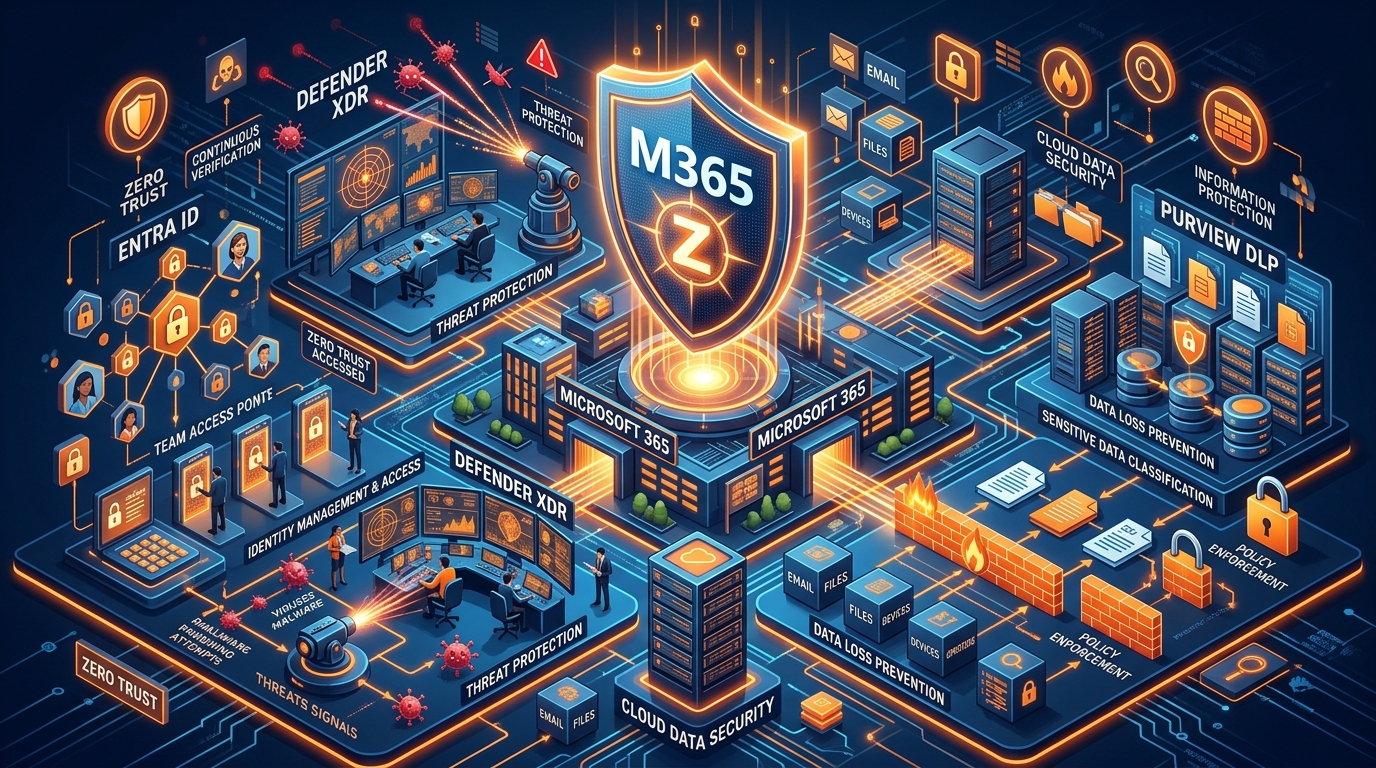
Figure 3: High-Tech 3D Visualization of Microsoft 365 Zero Trust Security.
1. Modern Identity Protection & Conditional Access Policies (CAP)
An enterprise cloud migration provider enforces strict Conditional Access Policies using Microsoft Entra ID P1/P2 licenses:
- Complete Deprecation of Legacy Authentication: Enforcing tenant-wide block policies against legacy protocols (POP3, IMAP, SMTP).
- Risk-Based Conditional Access: Leveraging Microsoft Entra ID Protection engines to trigger step-up MFA or password resets on risky logins.
- Device Compliance Enforcement: Requiring Intune enrollment before granting full access to SharePoint Online or Teams.
- FIDO2 & Passwordless Integration: Deploying hardware security keys and Windows Hello for Business.
2. Microsoft Purview Information Protection & DLP
Protecting proprietary data, intellectual property, and PII via Sensitivity Labeling, Data Loss Prevention (DLP) rules, and Unified Audit Logging.
3. Threat Protection & Domain Security Hardening
Securing incoming and outgoing email vectors via Safe Links, Safe Attachments, and SPF/DKIM/DMARC (p=reject) enforcement.
To review additional security blueprints, visit the centralized Work365 Knowledge Base.
Technical Data Comparison: In-House IT Execution vs. Certified Implementation Partner
| Operational Focus Area | In-House IT Staff Execution | Certified Microsoft 365 Deployment Partner |
|---|---|---|
| Architectural Design & Sizing | Relies on generalized documentation and trial-and-error configurations. | Delivers battle-tested topologies engineered for enterprise scale. |
| Project Velocity & Timeline | Stretched across months or years due to daily operational IT tickets. | Executed within tight, predictable timeframes using automated toolsets. |
| Business Downtime Risks | Elevated risk of cutover interruptions, DNS delays, and mail delivery failure. | Guaranteed zero-downtime cutover backed by strict project SLAs. |
| Identity & Authentication Setup | Prone to duplicated user accounts, broken UPNs, and login loops. | Flawless Entra ID synchronization using explicit Hard-Matching routines. |
| Security Posture & Compliance | Default tenant settings often leave legacy auth and weak protocols open. | Complete Zero Trust hardening, Intune policies, DLP, and DMARC enforcement. |
| Archive & Data Preservation | Manual PST ingestion leads to data corruption and missing folder trees. | Automated Graph API streaming preserving metadata, permissions, and histories. |
| Change Management & Adoption | Minimal end-user guidance leading to high helpdesk ticket spikes. | Comprehensive training documentation, user communication plans, and support. |
| Total Cost of Ownership (TCO) | High hidden costs driven by downtime, wasted internal labor, and post-fix fees. | Predictable, fixed-scope investment with clear milestone deliverables. |
Enterprise Partner Evaluation Checklist
- 1. Official Microsoft Partner Competencies: Verifiable Microsoft Solutions Partner designations in Modern Work and Security.
- 2. Proven Hybrid & Tenant-to-Tenant Track Record: Demonstrated experience managing complex Exchange Hybrid topologies.
- 3. Comprehensive Security & Governance Expertise: Proficiency in designing Entra ID Conditional Access Policies and Purview DLP.
- 4. Data Integrity & SLA-Backed Delivery Frameworks: Explicit SLAs guaranteeing zero downtime during migration cutovers.
- 5. Post-Migration Hypercare & Operational Enablement: Dedicated post-cutover support teams ("Hypercare").
Conclusion & Strategic Conversion Call-to-Action
Modernizing your corporate enterprise by migrating to Microsoft 365 provides immense operational capabilities, advanced cybersecurity defenses, and simplified management. Partnering with an experienced microsoft office 365 consultant ensures your organization avoids costly downtime, protects critical data assets, and realizes immediate ROI.
Accelerate Your Cloud Transformation
- Explore Implementation Tiers: Select the precise operational package for your enterprise by visiting our Office 365 Package & Pricing directory.
- Deepen Technical Insights: Access technical whitepapers and guides in the Work365 Knowledge Base.
- Read Our Advanced Technical Guide: Explore technical best practices in our comprehensive Microsoft Office 365 Consultant Guide.
- Master PST & Data Ingestion: Learn how to ingest legacy archive databases securely with our step-by-step Import PST to Office 365 Guide.
Get Genuine Office 365 Pack for $10
Unlock full desktop applications, 1TB OneDrive cloud storage, and 1-year full warranty.
Order $10 Pack via WhatsApp