Microsoft Office vs 365: Enterprise Migration Guide
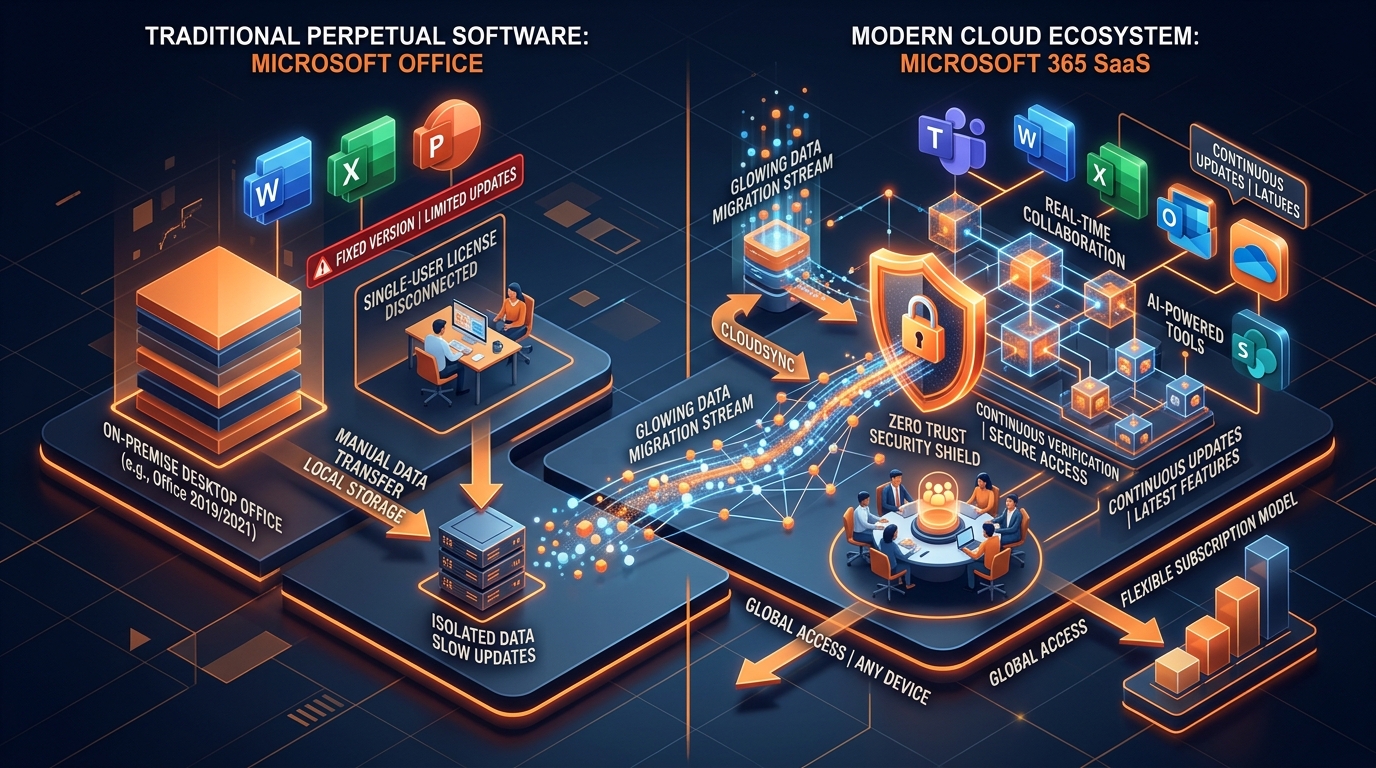
Figure 1: Enterprise Architectural Comparison - Perpetual Microsoft Office vs. Cloud-Native Microsoft 365 SaaS Ecosystem.
Introduction: The Architectural Tipping Point for Enterprise IT
The modern enterprise software ecosystem has reached a definitive tipping point. For Chief Technology Officers (CTOs), IT Directors, and Enterprise Operations Managers, the architectural debate surrounding microsoft office vs 365 is no longer merely a question of purchasing perpetual software licenses versus recurring subscriptions. It is a fundamental strategic choice between maintaining rigid, perimeter-bound legacy desktop suites or adopting a dynamic, cloud-native enterprise engine.
Legacy desktop software—such as standalone Microsoft Office 2016, 2019, or 2024 perpetual licenses—places severe operational limits on modern organizations. Static desktop applications foster data silos, require manual patching routines, introduce high Capital Expenditure (CAPEX) cycles, and lack the real-time telemetry required to defend against advanced cybersecurity threats. Conversely, Microsoft 365 provides an integrated Software-as-a-Service (SaaS) architecture powered by Microsoft Entra ID, the Microsoft Graph API, and cloud-native security controls. To inspect genuine enterprise license options and plan tiers, explore our Office 365 Package & Pricing Guide.
Transitioning from an on-premises environment or standalone Office setup to a fully realized cloud tenant carries significant operational risk if executed without enterprise-grade planning. Improperly managed migrations frequently lead to:
- Unplanned mail flow outages and MX record routing loops
- Identity synchronization collisions and Active Directory corruption
- Severe end-user downtime and lost billable hours
- Exfiltration vulnerabilities due to misconfigured access policies
- Corrupted legacy archive files during large-scale ingestion
To eliminate these vulnerabilities, forward-thinking organizations engage a specialized cloud migration provider capable of orchestrating seamless, zero-downtime transitions. In this masterclass guide, we examine the technical, financial, and security dimensions of microsoft office vs 365, outlining the exact engineering frameworks required for enterprise-grade execution.
Core Architectural Differences: Microsoft Office vs 365
Understanding the structural divergence between traditional perpetual Microsoft Office suites and the Microsoft 365 cloud platform is essential for technical decision-makers evaluating long-term Total Cost of Ownership (TCO) and infrastructure agility.
Perpetual On-Premises Model vs. Cloud-Native SaaS Engine
Standalone Microsoft Office relies on a local installation model. Applications like Word, Excel, PowerPoint, and Outlook are installed on individual endpoints with static feature sets determined at the time of release. Updates are limited to security patches deployed via Windows Server Update Services (WSUS) or System Center Configuration Manager (SCCM/MECM). Data storage primarily relies on local drives, network-attached storage (NAS) shares, or localized Exchange servers.
Microsoft 365 operates on a microservices-based cloud platform. Applications are continuously updated with the latest feature builds via Click-to-Run (C2R) technology. User identities are anchored in Microsoft Entra ID, allowing seamless authentication across desktop, web, and mobile devices. Rather than relying on static file shares, user data resides in cloud storage solutions like OneDrive for Business and SharePoint Online, interconnected by the Microsoft Graph API.
Licensing & Financial Models: CAPEX vs. OPEX
From a financial perspective, perpetual Microsoft Office requires significant upfront capital investments (CAPEX) every three to four years. This model incurs hidden costs, including server infrastructure maintenance, client access licenses (CALs), backup infrastructure, and dedicated IT labor for software deployment and patching.
Microsoft 365 shifts productivity software to an Operational Expense (OPEX) subscription model. Organizations pay per user per month, allowing flexible scaling of seats as headcount changes. This predictability eliminates costly upgrade cycles while ensuring that every user remains on the most secure, feature-rich version of the software. For full plan details, review our Office 365 Pricing & Package Portal.
Feature Velocity, Collaborative Workflows, and AI Integration
In a perpetual Office environment, real-time co-authoring is constrained or non-existent, often leading to version control conflicts and duplicated files. Search capabilities are limited to local indexing engines, and cross-platform mobile functionality is severely restricted.
Microsoft 365 changes how teams collaborate through native features:
- Real-Time Co-Authoring: Multiple users work concurrently on Word, Excel, and PowerPoint documents stored in SharePoint Online or OneDrive.
- Microsoft Teams Integration: Unified communications combining persistent chat, voice, video conferencing, and document workspaces.
- Microsoft Copilot & AI Capabilities: Native integration of generative AI that parses enterprise data across emails, documents, and meetings via Microsoft Graph.
- Centralized Management: Automated policy enforcement, centralized telemetry, and instant provisioning through the Microsoft 365 Admin Center.
Operational Reality: Internal IT vs. Certified Partner Execution
Attempting an enterprise migration relying solely on internal IT staff often introduces significant operational friction. The table below contrasts internal IT execution with the advantages offered by a certified m365 deployment partner:
| Operational Metric | Internal IT Execution | Certified Implementation Partner |
|---|---|---|
| Time-to-Value & Velocity | Extended timelines (6–12 months) due to learning curves. | Rapid deployment (2–6 weeks) utilizing battle-tested automation. |
| Downtime & Business Impact | High risk of unexpected email outages and login failures. | Guaranteed zero-downtime methodology with background delta syncing. |
| Identity & Authentication | Potential configuration errors in Entra Connect and SSO. | Perfectly tuned identity federation, SSO, and Entra ID sync. |
| Data Integrity & PST Ingestion | Manual PST collection; risk of file corruption and loss. | Automated network discovery, PST staging, and Azure ingestion. For details, read our Import PST to Office 365 Guide. |
| Security & Compliance Baseline | Basic out-of-the-box configuration; key controls disabled. | Enterprise security hardening, DLP, and Purview compliance. For consulting support, explore our Microsoft Office 365 Consultant Guide. |
Conclusion: Maximize Enterprise Productivity with Expert Execution
Choosing between microsoft office vs 365 represents an opportunity to modernize your enterprise IT operations. While perpetual Microsoft Office desktop suites belong to an era of localized, perimeter-bound computing, Microsoft 365 delivers an agile, cloud-native workplace platform engineered for modern productivity, real-time collaboration, and Zero Trust security.
Ready to transform your enterprise productivity architecture? Explore our complete technical library at our Work365 Knowledge Base & Blog Index, or consult directly with our certified cloud architects today to design your customized, zero-downtime migration roadmap.
Ready to Upgrade Your Enterprise Cloud Workspace?
Get genuine Microsoft 365 enterprise packages with instant automated delivery, 1TB OneDrive cloud storage, and full 12-month warranty.
Explore Packages & Pricing