Office 365 Security Features 2026: Enterprise Guide
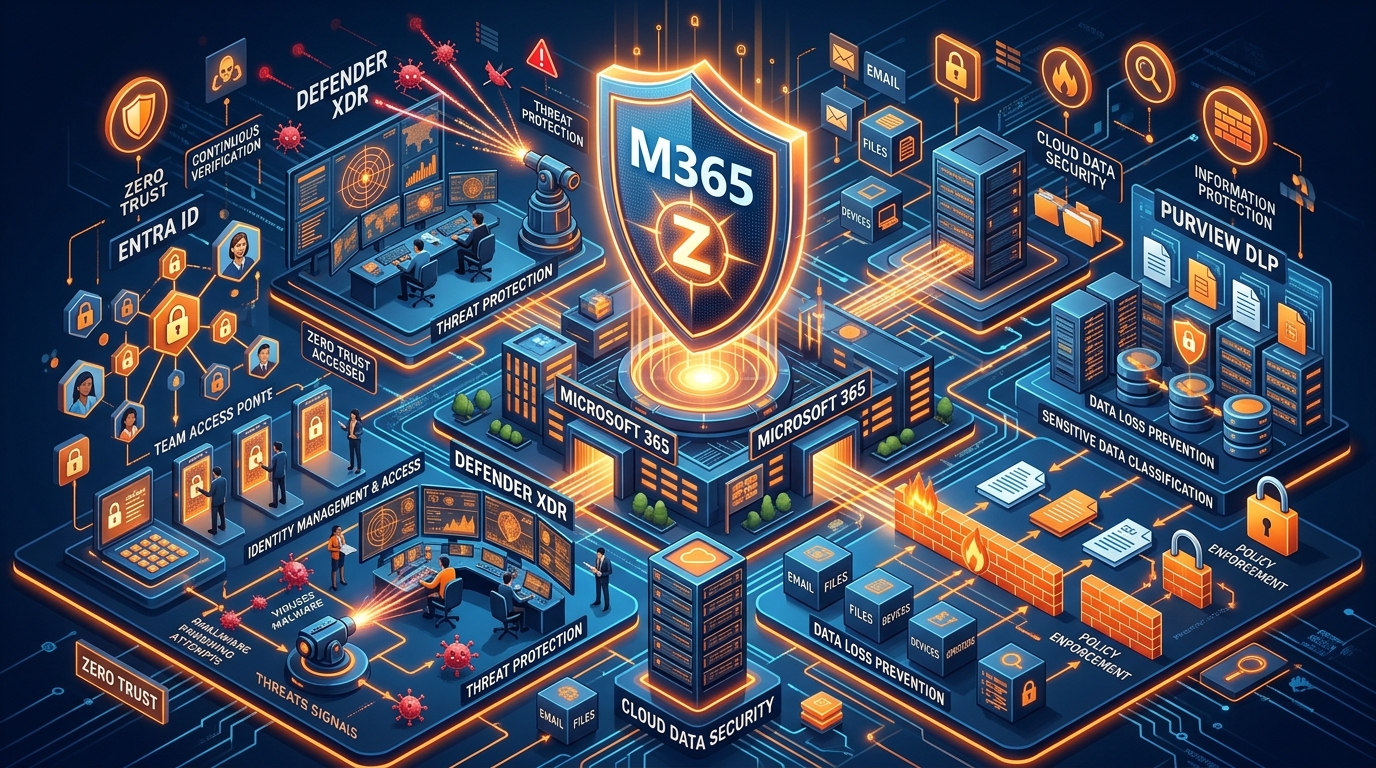
Figure 1: Microsoft 365 Enterprise Security & Reference Architecture in 2026.
Executive Summary: Navigating Enterprise Cybersecurity in 2026
The enterprise digital workspace faces an unprecedented cyber threat matrix. Threat actors leverage generative AI to craft hyper-personalized spear-phishing attacks, exploit compromised session tokens, and bypass traditional multi-factor authentication (MFA) controls. Concurrently, regulatory bodies across the globe have tightened compliance mandates—such as the European Union’s NIS2 Directive, updated FTC Safeguards, HIPAA modifications, and stringent ISO 27001 requirements—forcing enterprise C-suites to rethink their cloud security postures.
For IT Directors, Chief Technology Officers (CTOs), and Chief Information Security Officers (CISOs), relying on default cloud configurations is no longer a viable defense strategy. Operating Microsoft 365 without rigorous security hardening exposes organizations to catastrophic business risks: prolonged operational downtime, ransom demands, intellectual property theft, brand erosion, and severe regulatory non-compliance penalties.
Unlocking the full potential of Office 365 security features 2026 requires moving beyond basic licensing to architecting an end-to-end Zero Trust security framework. Achieving complete protection during enterprise cloud transitions requires aligning with a specialized cloud migration provider capable of executing seamless tenant configurations, policy enforcement, and infrastructure modernization.
Deep Dive: Core Office 365 Security Features in 2026
Microsoft 365 has evolved into an AI-augmented, identity-centric security powerhouse. Navigating its capabilities requires understanding how identity defense, threat prevention, data governance, and endpoint management interlock under a unified Zero Trust model.
1. Identity & Access Management: Microsoft Entra ID & Zero Trust
Identity serves as the primary security perimeter in contemporary cloud computing. Attackers no longer break into firewalls; they log in with stolen credentials.
- Continuous Access Evaluation (CAE): Traditional OAuth 2.0 access tokens remain valid for up to an hour after issuance, creating a window of vulnerability if credentials or session tokens are compromised. CAE continuously monitors active user sessions in real time. If a user's location abruptly changes, their device health drops below compliance standards, or an administrator revokes their account, Microsoft Entra ID immediately invalidates the access token and forces re-authentication.
- FIDO2 & Passwordless Authentication: In 2026, standard SMS and push-notification MFA are considered vulnerable to SIM-swapping and adversary-in-the-middle (AiTM) phishing kits. Implementing FIDO2 security keys, Windows Hello for Business, and platform authenticators ensures phishing-resistant authentication across all enterprise endpoints.
- Risk-Based Conditional Access Policies: Conditional Access policies evaluate dozens of telemetry signals in real time—including IP reputation, user behavior anomalies, device compliance status, and application sensitivity—before granting access. High-risk sign-ins trigger automated step-up MFA requirements or block access entirely until IT remediates the incident.
2. Threat Defense & AI Protection: Microsoft Defender XDR & Defender for Office 365
Email remains the primary attack vector for enterprise breaches. Microsoft Defender for Office 365 delivers multi-layered, automated threat prevention across email, Microsoft Teams, SharePoint, and OneDrive.
- Safe Links & Safe Attachments: Incoming messages and internal file shares undergo real-time detonation in isolated sandbox environments. Attachments are analyzed for zero-day malware behaviors before delivery, while links embedded in emails or documents are re-evaluated at the precise time of click to neutralize dynamic redirection attacks.
- AI Deception & Machine Learning Impersonation Protection: Advanced machine learning models map organizational communication graphs to identify executive impersonation, domain spoofing, and subtle display-name manipulations common in Business Email Compromise (BEC) schemes.
- Automated Investigation and Response (AIR): When a threat is detected post-delivery, AIR playbooks automatically launch investigation flows. The system correlates alerts, tracks the blast radius across mailboxes and endpoints, quarantines malicious artifacts, and presents actionable remediation summaries to security operations team members.
3. Data Protection & Governance: Microsoft Purview
Data governance requires proactive visibility and strict policy enforcement across structured and unstructured datasets.
- Unified Data Loss Prevention (DLP): Purview DLP policies monitor and prevent sensitive data exposure across Exchange Online, Teams chats, OneDrive repositories, SharePoint sites, and Windows/macOS endpoints. Built-in pattern recognition and trainable classifiers instantly flag credit card numbers, health records, source code, and custom proprietary formats.
- Sensitivity Labels with Auto-Classification & RMS: Sensitivity labels automatically apply encryption, visual markings (watermarks, headers), and Rights Management Services (RMS) access restrictions to emails and documents based on content analysis. Even if a sensitive PDF is downloaded to an unmanaged personal device, the embedded encryption ensures only authorized enterprise users can decrypt its contents.
- Insider Risk Management: By correlating behavioral telemetry from endpoints, cloud apps, and identity signals, Purview detects potential malicious or accidental insider threats—such as anomalous file downloads prior to an employee's resignation or mass sharing of intellectual property.
4. Workload & Endpoint Compliance: Microsoft Intune Integration
A secure cloud environment requires healthy, managed endpoints. Integrating Intune with Microsoft Entra ID enforces unified device governance.
- Mobile Application Management (MAM) vs. MDM: For enterprise environments supporting Bring Your Own Device (BYOD) policies, Intune MAM containerizes corporate data within approved mobile applications (Outlook, Word, OneDrive) without requiring full device enrollment. Corporate data cannot be copied or pasted into unmanaged personal applications, and IT can wipe corporate containers remotely if a personal phone is lost or stolen.
- Device Health Scoring & Conditional Access Gating: Devices must satisfy specific patch levels, disk encryption states (BitLocker/FileVault), and Defender endpoint health scores before being permitted to establish sessions with Microsoft 365 services.
Technical Architecture & Migration Strategies: Executing Zero-Downtime Transitions
Upgrading to enterprise-grade cloud security requires a solid foundational migration strategy. Transitioning from legacy messaging infrastructures to a fully secured Microsoft 365 tenant requires precise planning, robust topology design, and flaw-free execution.
Exchange to Microsoft 365 Migration Topologies
Organizations migrating from legacy on-premises Microsoft Exchange environments (Exchange Server 2013, 2016, or 2019) must select an architecture that guarantees zero data loss and uninterrupted mail flow during the transition.
- Full Hybrid Deployment: Ideal for enterprise organizations with large user bases (>500 seats) requiring phased migrations over weeks or months. Full Hybrid establishes secure cross-premises calendar free/busy sharing, unified global address lists (GAL), and seamless internal mail routing through Mutual TLS (mTLS).
- Minimal Hybrid Deployment: Designed for rapid, short-term migration windows where cross-premises integration features are only needed temporarily during mailbox move operations.
- Cutover & Staged Migration Topologies: Applicable for smaller environments or organizations decommissioning legacy Exchange deployments in a single maintenance window.
Executing an exchange to microsoft 365 migration requires careful architectural design to prevent mail loops, autodiscover service disruptions, and authentication failures. Navigating these complexities demands expert guidance; review our detailed Microsoft Office 365 Consultant Guide to learn how certified enterprise architects evaluate legacy environments.
Ingesting Legacy PST Archives & Data Stores
A major challenge during enterprise cloud onboarding involves migrating legacy Personal Storage Table (.pst) files scattered across legacy file servers, local user desktops, and SAN storage arrays. Unstructured PST files represent significant compliance risks, as they bypass centralized data retention and discovery policies.
Systematically ingesting PST archives directly into Exchange Online In-Place Archives ensures data is centrally protected under Purview DLP and retention controls. To examine the step-by-step technical procedures for network upload and drive shipping ingestion, refer to our comprehensive Import PST to Office 365 Guide.
Complex Enterprise Tenant Migration Scenarios
Corporate restructuring, mergers, acquisitions, and divestitures frequently require enterprise tenant migration strategies. Transferring thousands of user objects, mailboxes, SharePoint sites, Teams channels, and custom cloud apps from one Microsoft 365 tenant to another demands specialized tooling and orchestration.
- Cross-Tenant Mailbox & OneDrive Migration: Leveraging native Microsoft 365 cross-tenant migration capabilities allows direct tenant-to-tenant mailbox moves via backend Microsoft pipelines, reducing cutover windows from days to hours.
- Domain Coexistence & Rewriting: Maintaining brand continuity during long-term mergers requires deploying automated mail-rewriting solutions, ensuring external senders experience seamless address transitions regardless of backend mailbox residency.
- Identity Synchronization: Managing multi-forest Microsoft Entra Connect topologies to sync identities from multiple Active Directory domain trees into a target tenant requires expert identity mapping and conflict resolution workflows.
Organizations navigating these enterprise complexities must partner with an experienced m365 deployment partner to safeguard mission-critical business systems during transition phases.
Enterprise Decision Framework: In-House IT vs. Certified Partner Implementation
Attempting a large-scale tenant migration or deploying high-tier security features using unassisted internal IT resources often leads to misconfigurations, unexpected downtime, and critical coverage gaps. The table below compares internal IT execution with engaging a specialized, certified cloud transformation partner.
| Strategic Dimension | Unassisted In-House IT Execution | Certified Implementation Partner |
|---|---|---|
| Security Baseline Configuration | Default tenant settings, unhardened Conditional Access, elevated breach vulnerability. | Customized Zero Trust architecture, custom Purview DLP rulesets, fully hardened Entra ID baseline. |
| Migration Downtime Risk | High risk of MX routing errors, broken Autodiscover, extended weekend downtime. | Zero-downtime execution guaranteed by structured staging and hybrid topologies. |
| PST & Legacy Data Ingestion | Manual, error-prone file copying; risk of data corruption or orphaned archives. | Automated high-speed ingestion workflows using dedicated network upload pipelines. |
| Compliance & Audit Readiness | Manual reporting; potential non-compliance with GDPR, NIS2, or HIPAA mandates. | Built-in Purview audit logging, automated evidence collection, instant compliance mapping. |
| Post-Migration Operational TCO | Higher long-term costs driven by ongoing incident remediation and administrative churn. | Lower total cost of ownership through optimized licensing, automation, and proactive monitoring. |
| Specialized Cloud Expertise | Generalist knowledge constrained by daily helpdesk demands and routine ticket queues. | Deep domain specialization across complex email migration solutions and cloud architectures. |
Audit Checklist: Evaluating an Enterprise M365 Deployment Partner
Selecting the right partner to execute your tenant security transformation or cloud migration requires rigorous vendor evaluation. IT leaders should utilize the following 8-step evaluation methodology before signing an engagement agreement:
- Verify Microsoft Partner Certifications: Ensure the vendor holds verified Solution Partner designations in Security, Modern Work, and Infrastructure.
- Review Zero Trust Architecture Methodologies: Confirm the partner’s deployment framework explicitly covers continuous access evaluation, FIDO2 passwordless roadmaps, and Microsoft Purview DLP integrations.
- Inspect Hybrid Migration Experience: Validate that the partner has successfully delivered large-scale exchange to microsoft 365 migration projects for organizations with similar seat counts and regulatory requirements.
- Audit Data Loss Prevention (DLP) Policies: Evaluate the vendor’s custom DLP templates, sensitivity label taxonomies, and insider risk monitoring playbooks.
- Demand Zero-Downtime Service Level Agreements (SLAs): Ensure the contract includes enforceable SLAs covering mail routing continuity, identity sync stability, and system availability during cutover periods.
- Evaluate Post-Migration SOC Capability: Verify whether the partner offers ongoing managed security services, SOC integration, and continuous security posture monitoring (Microsoft Secure Score optimization).
- Analyze Training & Change Management Offerings: Confirm the inclusion of user adoption programs, executive anti-phishing training, and administrator knowledge transfer modules.
- Inspect Transparent Licensing & Service Pricing: Review transparent, fixed-scope service packages. Compare tailored implementation packages directly by visiting the official Office 365 Package & Pricing resource hub.
Hardening Guide: Implementing Microsoft 365 Baseline Security
To immediately improve your organization's Microsoft Secure Score and establish an effective threat posture, execute the following fundamental administrative policies:
Step-by-Step Security Baseline Setup
-
Enforce Phishing-Resistant MFA across All Administrative Roles:
Navigate to the Entra Admin Center and create a Conditional Access policy requiring FIDO2 security keys or certificate-based authentication for all high-privilege roles (Global Administrator, Exchange Administrator, Security Administrator). -
Block Legacy Authentication Protocols:
Legacy protocols (IMAP, POP3, SMTP AUTH, Basic Authentication) cannot evaluate Conditional Access policies, making them primary targets for password spraying attacks. Enforce complete legacy authentication blocks across all tenant endpoints. -
Configure Anti-Phishing & Anti-Spam Protection Rules:
Enable Defender for Office 365 Strict Preset Security Policies for executive mailboxes to maximize protection against display name spoofing, domain impersonation, and zero-day link redirection. -
Deploy Endpoint Data Loss Prevention Policies:
Establish Purview DLP policies restricting users from copying confidential financial files to unapproved USB removable storage devices or uploading corporate intellectual property to unauthorized personal cloud services. -
Establish Emergency Access "Break-Glass" Accounts:
Configure two dedicated emergency admin accounts excluded from standard Conditional Access rules to ensure administrative continuity during unforeseen authentication service disruptions. Secure credentials in physical, audited vaults.
For additional administrative best practices, technical articles, and strategic deployment playbooks, visit the comprehensive Work365 Knowledge Base.
Strategic Conclusion: Future-Proofing Your Cloud Enterprise
Securing the modern enterprise demands an integrated strategy that addresses identity, communication channels, endpoints, and corporate data repositories. Leveraging the comprehensive spectrum of office 365 security features 2026 ensures your organization remains resilient against sophisticated cyber threats while meeting global compliance mandates.
Attempting to navigate complex cloud migrations or security configurations without specialized expertise introduces unnecessary operational friction and unacceptable security risks. Partnering with a proven cloud migration provider ensures your digital transformation is executed flawlessly, safely, and with zero business interruption.
Accelerate Your Cloud Security Journey Today
Ready to modernize your cloud architecture, execute a zero-downtime migration, or harden your tenant against advanced threats?
- Explore transparent deployment tiers and custom service plans: Visit Office 365 Package & Pricing.
- Schedule a technical consultation with our cloud architects: Read our Microsoft Office 365 Consultant Guide.
- Deepen your technical knowledge with expert-curated deployment articles: Access the Work365 Knowledge Base.
Get Genuine Office 365 Pack for $10
Unlock full desktop applications, 1TB OneDrive cloud storage, and 1-year full warranty.
Order $10 Pack via WhatsApp