Why Hire an Office 365 Consultant? Enterprise Migration Guide
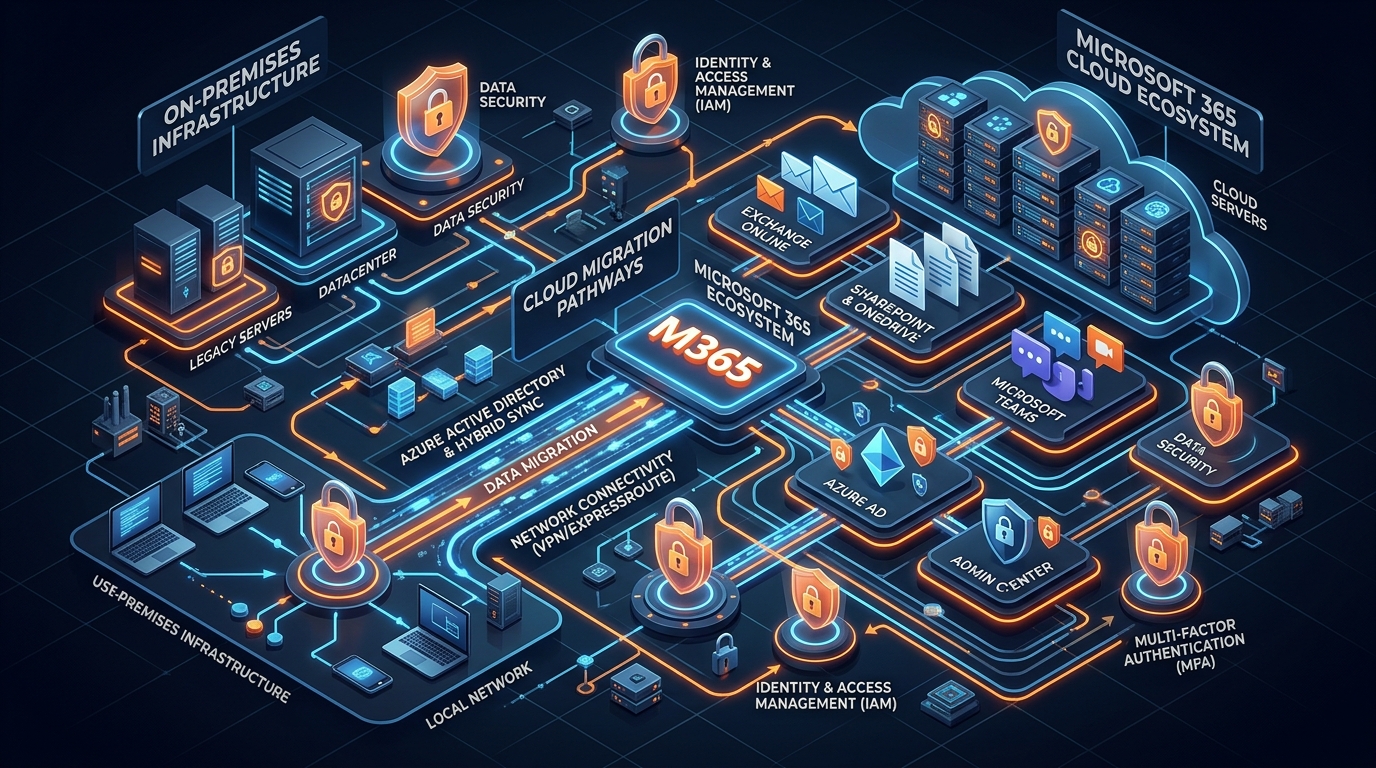
Figure 1: Enterprise Microsoft 365 Cloud Migration & Identity Ecosystem Architecture.
Introduction: The Strategic Imperative
Transitioning an enterprise IT ecosystem to Microsoft 365 is rarely a simple matter of moving mailboxes. For modern enterprises, IT Directors, CTOs, and Operations Managers, a migration represents a foundational overhaul of identity infrastructure, data governance, cybersecurity posture, and real-time collaboration workflows.
Attempting an in-house exchange to microsoft 365 migration without specialized oversight routinely leads to unplanned downtime, identity sync collisions, corrupted metadata, broken security policies, and spiraling licensing costs.
Partnering with an experienced office 365 consultant bridges the gap between complex legacy architectures and an optimized cloud infrastructure. A certified m365 deployment partner brings proven methodologies, automated migration tooling, and deep architectural domain knowledge to ensure your transformation achieves zero business disruption while enforcing strict Zero Trust security standards.
This comprehensive guide details the technical architectures, execution frameworks, identity synchronization models, and security governance protocols required for a successful enterprise deployment.
1. Enterprise Migration Architectures & Topologies
Selecting the correct migration architecture is the single most critical decision in planning an enterprise transition to Microsoft 365. The optimal topology depends directly on your legacy source environment, directory structures, mailbox volume, network throughput, and coexistence requirements.
Exchange to Microsoft 365 Migration Mechanics
When transitioning from legacy Microsoft Exchange Server environments (2010, 2013, 2016, or 2019) to Exchange Online, an enterprise cloud migration provider evaluates four primary topologies:
1. Cutover Migration
- Target Scope: Organizations with fewer than 2,000 mailboxes seeking a rapid transition.
- Execution Model: All mailboxes, contacts, and distribution groups are migrated in a single maintenance window over a weekend.
- Architectural Reality: While Microsoft technically supports up to 2,000 mailboxes, performance bottlenecks in Exchange Web Services (EWS) make cutover migrations practically ideal only for organizations under 150-300 mailboxes.
2. Staged Migration
- Target Scope: Organizations running Exchange 2003 or 2007 with more than 2,000 mailboxes.
- Execution Model: Mailboxes are migrated in batches over time. Requires Active Directory synchronization via Microsoft Entra Connect.
- Coexistence: Resource mailboxes, accounts, and directory objects are synchronized, but cross-premise free/busy calendar sharing is restricted.
3. Hybrid Coexistence Architecture (Minimal vs. Full Modern Hybrid)
- Target Scope: Enterprise organizations (1,000+ users) requiring phased migration timelines without disruption to daily operations.
- Full Modern Hybrid: Deploys the Hybrid Agent or configures Exchange Federation via the Hybrid Configuration Wizard (HCW). Establishes secure TLS transport queues between on-premises Exchange Edge/Hub Transport servers and Exchange Online Protection (EOP).
- Capabilities: Full cross-premise calendar free/busy lookup, seamless Mailbox Replication Service (MRS) proxy migrations, unified global address list (GAL) updates, and transparent internal mail routing without header modifications.
- Minimal Hybrid: Designed for rapid batch migration where long-term coexistence is unnecessary. Bypasses complex cross-premise federation while maintaining encrypted MRS proxy data ingestion streams.
4. Tenant-to-Tenant (T2T) Migrations
- Target Scope: Mergers, acquisitions, and corporate divestitures requiring enterprise tenant migration between two distinct Microsoft 365 environments.
- Execution Model: Requires domain detachment from the source tenant, target domain validation, automated user provisioning, and parallel data replication using specialized third-party tools (e.g., Quest, BitTitan, ShareGate).
- Challenge: Consolidating domain names (e.g., vanity domain switching) within narrow cutover windows while managing dual-tenant mail routing coexistence.
Network & Mail Routing Coexistence Architecture
Maintaining uninterrupted mail delivery throughout an email migration solutions rollout requires careful MX record TTL management, routing domain configuration, and mail flow security alignment:
Technical Insight: Prior to executing cutover, reduce the Time-To-Live (TTL) on your public DNS MX records from 24 hours (86,400 seconds) to 5 minutes (300 seconds) at least one week in advance. This guarantees rapid DNS propagation when switching mail flow to Exchange Online Protection.
- Inbound Routing: Configure Exchange Online Protection (EOP) as the primary MX endpoint. EOP scans inbound mail for spam, malware, and zero-day threats via Defender for Office 365, then routes internal traffic bound for on-premises mailboxes across encrypted Outbound Connectors.
- Outbound Routing: Internal mail generated on-premises is routed to M365 via Inbound Connectors enforced by TLS certificates matching your hybrid FQDN (e.g.,
mail.yourdomain.com). - Autodiscover Configuration: Implement split-brain DNS so internal network queries return on-premises Exchange Autodiscover internal endpoints, while external users resolve to
autodiscover.outlook.com.
2. Identity Synchronization & Directory Integration Architecture
Identity is the control plane of Microsoft 365. Implementing a secure, scalable identity model prevents credential duplication, mitigates unauthorized access risks, and enables seamless single sign-on (SSO).

Figure 2: Enterprise Directory Integration Architecture with Entra ID and Active Directory.
Directory Integration Models (Entra ID Connect)
An expert office 365 consultant designs identity synchronization topologies based on organizational compliance, identity provider investments, and operational complexity.
| Topology / Feature | Password Hash Synchronization (PHS) | Pass-Through Authentication (PTA) | Active Directory Federation Services (AD FS) |
|---|---|---|---|
| Authentication Source | Entra ID (Azure AD) | On-Premises Active Directory | On-Premises AD FS Farm |
| On-Prem Server Dependency | Low (Sync agent only) | High (Requires active agent pool) | Critical (Requires redundant proxies & ADFS servers) |
| SSO Experience | Seamless SSO (Kerberos / NTLM) | Seamless SSO (Kerberos / NTLM) | Federated SAML 2.0 / WS-Trust Token |
| Disaster Recovery Resiliency | Highest (Cloud-native auth) | Medium (Dependent on local AD availability) | Low (Single point of failure if ADFS goes down) |
| Complex Security Policies | Fully supported via Entra ID | Enforced at local AD level | Enforced on-premises |
1. Password Hash Synchronization (PHS)
The recommended baseline for most enterprise deployments. Entra ID Connect hashes the hash of a user's password 1,000 times using SHA-256 and syncs it securely to Entra ID every 2 minutes. Provides maximum operational uptime, as authentication occurs natively in Microsoft Cloud even if local domain controllers fail.
2. Pass-Through Authentication (PTA)
Validates user credentials directly against local Active Directory Domain Controllers in real-time via lightweight outbound-only agents installed on-premises. Ideal for organizations under strict regulatory constraints that prohibit storing password hashes—even multi-hashed versions—in the cloud.
3. Federated Identity (AD FS)
Offloads authentication to an on-premises or cloud-hosted AD FS infrastructure. While historically popular, AD FS adds architectural complexity, administrative overhead, and potential single-point-of-failure vulnerabilities. Modern deployments favor PHS with Seamless SSO or Entra ID Certificate-Based Authentication (CBA).
Immutable ID Matching & Provisioning Frameworks
During hybrid directory configuration, soft-matching (matching accounts based on UserPrincipalName or ProxyAddresses) can lead to account duplication or identity collision.
Professional migration teams enforce hard-matching using the immutable attribute: ImmutableID = Base64(objectGUID).
In modern Entra ID Connect deployments, Microsoft utilizes mS-DS-ConsistencyGuid as the primary source anchor attribute. This allows seamless user object movement across Active Directory domains without breaking cloud identity links or corrupting user profile associations.
3. Data Migration Architecture & Zero-Downtime Execution
Executing enterprise data ingestion without impacting network bandwidth or business operations requires dedicated migration pipelines, payload staging, and API rate-limiting mitigation.
High-Throughput Mailbox Ingestion
Mailbox data migration utilizes the Exchange Mailbox Replication Service (MRS) Proxy engine operating over Web Services endpoints.
- Mailbox Replication Service (MRS): Operates on block-level data syncs, pulling raw mailbox stores directly into Exchange Online databases. MRS performs initial seed syncs while users remain active, followed by automated incremental delta syncs every 24 hours.
- Legacy Archive & PST Ingestion: Legacy
.pstfiles scattered across network shares or endpoint devices represent severe security compliance risks. Enterprise consultants deploy automated network upload scripts or drive shipping methods directly into Azure Storage accounts for ingestion. Learn more about structural PST remediation in our detailed Import PST to Office 365 Guide.
Unstructured Data Migration (SharePoint Online & OneDrive for Business)
Migrating legacy file shares (SAN/NAS networks), SharePoint Server on-premises, and Google Drive environments into SharePoint Online and OneDrive for Business requires structural remediation:

Figure 3: Enterprise Data Ingestion Pipelines & Azure Blob Staging.
Path Length & Naming Constraints
SharePoint Online enforces a 400-character URL path limit. Legacy file structures exceeding nested folder depths must be scanned, flattened, and renamed using automated remediation utilities before ingestion.
Throttling & HTTP 429 Mitigation
Microsoft 365 API endpoints implement strict rate limiting to protect multi-tenant infrastructure. Migrating large data volumes via standard CSOM/REST calls triggers HTTP 429 (Too Many Requests) responses.
Certified consultants deploy multi-threaded migration tools (e.g., SharePoint Migration Tool - SPMT, Migration Accelerator, or ShareGate) leveraging the Microsoft 365 Migration API, which streams data directly into Azure Blob storage before background platform ingestion.
Permissions & Metadata Mapping
NTFS access control lists (ACLs) are programmatically translated to SharePoint Online permission levels (Read & Execute to Read, Modify to Edit, Full Control to Owner). Metadata like Created By and Modified Date is preserved 100%.
4. Security Hardening, Zero Trust & Compliance Post-Migration
Deploying Microsoft 365 without robust security configurations leaves your organization exposed to credential harvesting, unauthorized tenant access, and data exfiltration. An elite office 365 consultant implements a defense-in-depth posture using the Zero Trust Security Framework (Never Trust, Always Verify).

Figure 4: Zero Trust Security Enclaves & Microsoft Purview DLP Architecture.
Zero Trust Architecture & Conditional Access Policy Enforcement
Conditional Access acts as the decision engine for access control in Microsoft 365. Policies evaluate real-time signals (user identity, device state, IP location, application context, real-time risk score) before granting access.
Core Enterprise Baseline Policies
- Mandatory Multi-Factor Authentication (MFA): Enforce FIDO2 security keys, Microsoft Authenticator push notifications, or Certificate-Based Authentication across all users. Disable legacy SMS/Voice protocols vulnerable to SIM-swapping.
- Block Legacy Authentication: Disable basic authentication protocols (POP3, IMAP4, SMTP AUTH, MAPI over HTTP) via Entra ID Authentication Policies to stop credential stuffing attacks.
- Device Compliance Enforcement: Restrict access to corporate cloud assets (Teams, SharePoint, Exchange) exclusively to compliant, managed devices enrolled in Microsoft Intune running active EDR agents (Defender for Endpoint).
- Risk-Based Conditional Access: Integrate Entra ID Protection signals to trigger password changes or access blocks automatically when user accounts or sign-ins show medium-to-high risk levels.
Information Governance & Data Loss Prevention (DLP) via Microsoft Purview
Data protection requires unified visibility and automated controls over enterprise information assets:
- Sensitivity Labels: Apply cryptographic encryption, visual marking, and Rights Management Services (RMS) protection directly to files and emails based on data sensitivity (e.g., Confidential / Restricted, Internal Only, Public). Protection persists regardless of where the file travels outside the organization.
- Data Loss Prevention (DLP) Rules: Block users from sharing sensitive data types—such as Personally Identifiable Information (PII), PCI-DSS credit card numbers, or proprietary source code—via Exchange email, Teams chats, or external SharePoint sharing links.
- eDiscovery & Audit Retention: Configure Unified Audit Logging (UAL) alongside Purview eDiscovery (Premium) retention policies to ensure legally defensible data preservation in compliance with HIPAA, GDPR, SOC2, and FINRA standards.
5. Internal IT Limitations vs. Certified Implementation Partner
Managing an enterprise Microsoft 365 rollout internally forces internal IT teams to execute complex, high-risk operational steps while simultaneously maintaining standard business operations.
The comparison below highlights the operational differences between leveraging internal IT resources versus engaging a dedicated m365 deployment partner:
| Operational Parameter | Internal IT Execution | Certified M365 Deployment Partner |
|---|---|---|
| Domain Experience | Intermittent; migration occurs once every 5-10 years. | Dedicated; hundreds of successful enterprise tenant migrations executed. |
| Downtime & Outage Risk | High; elevated risk of email downtime, lost PST files, and broken calendar links. | Near Zero; backed by deterministic cutover methodologies and SLA guarantees. |
| Identity Infrastructure | Prone to soft-matching errors, duplicate objects, and fragmented SSO topologies. | Hard-matched Entra ID synchronization via custom PowerShell & automated tooling. |
| Security Hardening | Basic out-of-the-box settings; default tenant configurations left unhardened. | Comprehensive Zero Trust posture, Intune baselines, and custom Purview DLP rules. |
| Project Delivery Speed | Low; delayed by daily helpdesk requests and operational fires. | Rapid; structured execution using dedicated migration engineers and clear timelines. |
| Licensing Optimization | Over-provisioning high-tier licenses (e.g., blanket E5 usage without utilization). | Precision licensing alignment; identifies cost-saving features and removes duplicate SaaS tools. |
6. Executive Evaluation Checklist: How to Choose a Cloud Migration Provider
Selecting the right professional services partner requires evaluating technical capabilities, security practices, and proven track records. Use this checklist during your vendor procurement phase:
-
1. VERIFIED MICROSOFT SPECIALIZATIONS & DESIGNATIONS
- Solutions Partner Designation for Infrastructure, Data & AI, and Modern Work.
- Certified Microsoft 365 Enterprise Administrators on team staff.
-
2. PROVEN HYBRID & TENANT-TO-TENANT ARCHITECTURAL EXPERIENCE
- Demonstrated experience handling multi-thousand mailbox hybrid environments.
- Proven expertise in complex cross-tenant (M&A) data and domain cutovers.
-
3. COMPREHENSIVE SECURITY & GOVERNANCE CAPABILITIES
- Proficiency in Entra ID, Conditional Access, Intune, and Microsoft Purview DLP.
- Expertise in implementing Zero Trust architecture and DMARC enforcement.
-
4. ROBUST DATA INTEGRITY & ZERO-DOWNTIME SLAs
- SLA-backed zero-downtime mailbox and data ingestion guarantees.
- Automated baseline and delta sync procedures to ensure zero data loss.
-
5. END-TO-END CHANGE MANAGEMENT & 24/7 POST-MIGRATION SUPPORT
- Structured user training resources, IT documentation, and helpdesk support.
- Post-cutover hypercare support to resolve issues immediately.
7. Licensing Architecture, Cost Optimization, and ROI Strategy
A frequent pitfall of unassisted cloud migrations is long-term licensing bloat. Organizations routinely over-allocate expensive enterprise SKUs without fully utilizing their features.
Strategic License Profiling
An authoritative office 365 consultant conducts a license consumption assessment to match user roles with cost-effective licensing tiers:
- Frontline Workers (Microsoft 365 F1/F3): Tailored for shift-based or non-desk personnel requiring web-only access to email, Teams chat, and baseline productivity apps at lower price points.
- Core Corporate Users (Business Premium vs. Enterprise E3): Organizations under 300 seats leverage Microsoft 365 Business Premium, which includes advanced Defender for Business security features and Intune management at a reduced rate compared to enterprise tiers.
- Executive & High-Security Roles (Enterprise E5 / Security E5 Add-on): Reserved for users requiring advanced eDiscovery, Entra ID Governance, Microsoft Defender for Identity, and automated Purview data protection capabilities.
SaaS Consolidation & Cost Reduction
Consolidating redundant third-party tools into standard M365 capabilities yields immediate infrastructure savings:
- Replace Third-Party MDM / EMM Solution: Transition legacy enrollment platforms directly to Microsoft Intune.
- Consolidate Identity Providers: Migrate SSO applications from expensive external providers to Entra ID (Azure AD) Application Proxy and Single Sign-On.
- Eliminate External Video Conferencing: Sunset legacy web conferencing tools by fully deploying native Microsoft Teams Voice and Teams Rooms solutions.
To review modular implementation options tailored to your seat count, explore our complete breakdown of services on our Office 365 Package & Pricing page.
For additional operational insights into cloud management strategies, visit our extensive Work365 Knowledge Base and read our comprehensive Microsoft Office 365 Consultant Guide.
Technical Conclusion & Action Plan
Migrating an enterprise environment to Microsoft 365 is a major strategic investment that requires precise architectural planning, zero-downtime execution, and comprehensive post-migration security governance.
Relying on internal teams to navigate complex hybrid topologies, Entra ID sync mechanics, and Purview compliance enforcement often leads to budget overruns, operational friction, and security gaps.
Engaging an experienced office 365 consultant gives your business access to battle-tested migration frameworks, custom migration automation tooling, and hardened Zero Trust infrastructure design.
Take the Next Step Toward Enterprise Cloud Transformation
- Review Execution Services: Detailed pricing models and phased implementation scopes are available on our Office 365 Package & Pricing page.
- Expand Your Knowledge: Read deep technical guides in the Work365 Knowledge Base or reference our Microsoft Office 365 Consultant Guide.
- Request an Architectural Audit: Partner with accredited cloud architects to map out your zero-downtime enterprise migration strategy today.
Get Genuine Office 365 Pack for $10
Unlock full desktop applications, 1TB OneDrive cloud storage, and 1-year full warranty.
Order $10 Pack via WhatsApp